What to Say in Your First Auto-DM Message
You set up automation. Someone comments. The DM fires.
And then… crickets.
They don't reply. They don't click. They don't convert.
The automation worked. The message didn't.
That's the real problem most creators and small businesses run into. They obsess over setting up the trigger but write the first DM in 30 seconds and it shows.
Your first auto-DM is your first impression. It either opens a conversation or kills it. Here's exactly what to say, what to avoid, and real examples you can swipe.
Why Your First Auto-DM Message Matters More Than You Think
When someone comments on your post or replies to your Story, they're warm. They just engaged. They're curious.
But the second your DM lands, they shift from "interested" to "is this a bot?"
If the message feels robotic, they ignore it. If it feels human, they reply.
That's it. That's the whole game.
The goal of your first auto-DM is not to sell. It's not to dump a link. It's to start a conversation or at least make them feel like a real person sent it.
The 4 Things Every Good First Auto-DM Must Do
Before you write a single word, understand what the message needs to accomplish:
Acknowledge why you're DMing — Reference the comment or Story reply. Don't just send a random message out of nowhere.
Deliver value immediately — Give them the thing they asked for (link, freebie, info) or tease it clearly.
Feel personal, not broadcast — No "Dear Valued Customer" energy. Write like a real human.
Have one clear next step — One CTA. Not three links. Not a paragraph of options.
What NOT to Say in Your First Auto-DM
Let's kill the bad habits first.
❌ "Hi! Thanks for your interest in our products!" — Zero context. Sounds like a newsletter.
❌ "Hey! Here's the link you asked for: [URL]" — No warmth. No context. You're just a link-delivery robot.
❌ "Hello! I saw your comment. Please check out our website for more details." — Vague. Lazy. Deleted instantly.
❌ "Hi [First Name], we noticed you engaged with our content and wanted to reach out!" — Corporate. Nobody talks like this.
The common thread? These messages sound automated even when they're trying not to.
Auto-DM Templates That Actually Work
Here are real examples across different use cases. Swipe, edit, make them yours.
For a Creator Offering a Free Resource
"Hey! 👋 Dropping the free [resource name] right here — [link] Lmk if you have questions, happy to help!"
Why it works: Short. Delivers immediately. Ends with an open door.
For a Salon or Clinic Running a Promotion
"Hey! Saw your comment on the [post topic] post 🙌 Here's the offer link: [link] Slots are filling up — want me to hold one for you?"
Why it works: Creates urgency. Asks a question that prompts a reply. If they say yes, you have a conversation — and a lead. (See how this connects to full booking flows in our guide on how to turn Story replies into bookings.
For a Small Business Capturing Leads
"Hey [First Name]! Thanks for the comment 😊 Quick question — are you looking for [service] for yourself or someone else? Just helps me point you to the right thing!"
Why it works: Instead of dumping info, it qualifies first. This is especially powerful for high-ticket services. We go deep on this in how to qualify leads inside Instagram DMs.
For a Course Seller or Coach
"Hey! Here's the [freebie/guide/link] you asked for 👇 [link] If you want the full breakdown, I do a free 15-min call too — want the link?"
Why it works: Delivers value first, upsell is optional and soft.
For a Jeweler or Product Brand
"Hey! 💍 Here's the piece you were asking about — [link] Available in [X options]. Want me to send more pics or sizing info?"
Why it works: Personal, helpful, invites a response. Feels like a real shop assistant, not a bot.
The Formula Behind All of These
[Reference the trigger] + [Deliver or tease the value] + [Ask one question or give one CTA]
That's it. Three parts. Under 50 words. Every time.
The shorter, the better. People are on their phones, in between things. They're not reading paragraphs.
Personalization: The Secret Weapon
Even in automation, personalization is possible.
Most good tools including PilotDM let you use the person's first name, reference the post they commented on, or trigger different messages based on the keyword they used.
This means someone who comments "PRICE" gets a different DM than someone who comments "INFO."
Tailored messages = higher reply rates. Every time.
Timing: When Should the Auto-DM Fire?
Instant. Not 10 minutes later. Not an hour.
When someone comments, they're in the moment. The faster your DM lands, the more likely they remember the context and engage.
Instant auto-DMs consistently outperform delayed ones — especially on Reels where comment volume can spike fast.
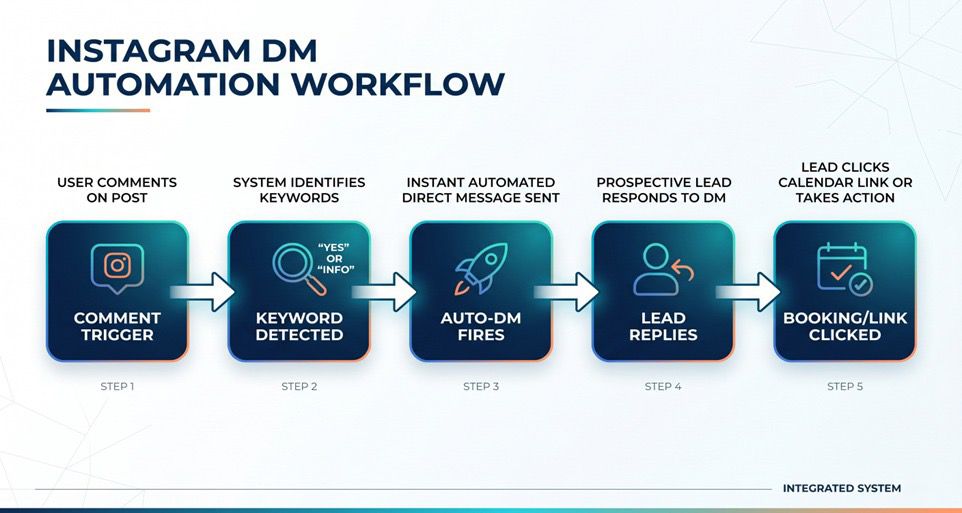
One Real Flow: Reel → Comment → DM → Booking
Here's a full example of how this plays out for a salon:
Reel posted: "Book your summer glow treatment 🌞 Comment GLOW for details"
Someone comments: "GLOW"
Auto-DM fires instantly: "Hey [Name]! 🌸 Here's the booking link for our summer glow treatment: [link]. Spots are limited — grab yours before they're gone!"
They click, book, done.
No manual follow-up. No missed DMs. No leads lost.
For more examples like this, check out Instagram automation for salons, clinics, and cafes.
What PilotDM Does Differently
Most tools let you set up a basic auto-DM. PilotDM goes further — you can:
Trigger different DMs based on specific keywords
Collect email or phone inside the DM flow
Route leads to a booking link automatically
Use Safe Mode to stay within Instagram's limits
And it's free to start — no credit card, no complex setup.
FAQ: First Auto-DM Messages
Q: Should my first auto-DM include a link?
Yes — if that's what they asked for. But always add a line of context before or after. A naked link with no warmth feels spammy.
Q: How long should my first auto-DM be?
Under 50 words ideally. 3–4 short lines max. If you need to say more, save it for the follow-up.
Q: Will people know it's automated?
If you write it naturally and reference the comment, most people won't care — or won't notice. The goal is for it to feel helpful, not human-like to the point of deception.
Q: Can I send different DMs to different commenters?
Yes. With keyword-based triggers, you can send completely different messages depending on what someone comments. This is one of the highest-ROI moves in Instagram automation.
Q: What if they don't reply to the first DM?
That's what follow-ups are for. But don't spam. One thoughtful follow-up 24–48 hours later is enough. We covered this fully in how to follow up on Instagram leads without sounding spammy.
Your automation is only as good as your message.
Get the trigger right. Write the DM like a human. Keep it short. Give one clear next step.
Do that, and your first auto-DM won't just deliver — it'll convert.
👉 Start free at pilotdm.com