How to Turn Instagram Story Replies Into Bookings (Free DM Automation)

How to Turn Instagram Story Replies Into Bookings Using DM Automation
Instagram Stories are one of the highest-converting tools for local businesses but most businesses are losing bookings every single day.
A Story reply isn't just engagement. It's a warm lead already inside your DMs.
Whether you run a salon, clinic, café, jewelry brand, or any local business when someone replies to your Story, they're interested. The question is: are you using Instagram Story reply automation fast enough to capture that intent?
This guide shows you exactly how to turn Instagram Story replies into confirmed bookings using a simple, free DM automation setup.
Why Instagram Story Replies Are High-Intent Leads
There's a big difference between a Story view and a Story reply.
A view is passive. A reply is active intent.
When someone replies to your Story, they have already:
Paid attention to your content
Shown genuine interest in your offer
Opened a private, one-on-one conversation with you
That's a strong buying signal stronger than a like, a comment, or even a profile visit.
Instagram Story reply automation works because the intent is already there. You're not convincing anyone. You're just capturing someone who is already interested.
Story replies are the closest thing to a customer walking into your store and asking, "Can I book this?"
The #1 Booking Mistake Most Businesses Make
Most businesses post Stories like this:
"Reply BOOK to get details"
Replies come in. But then:
The response is delayed by hours
There's no clear next step
The conversation gets messy and drops off
Result: a lost booking.
Instagram runs on momentum. If you don't respond fast and guide the user clearly, they move on. The window is short sometimes just minutes.
This is exactly why Instagram booking automation matters not because you're lazy, but because speed wins.
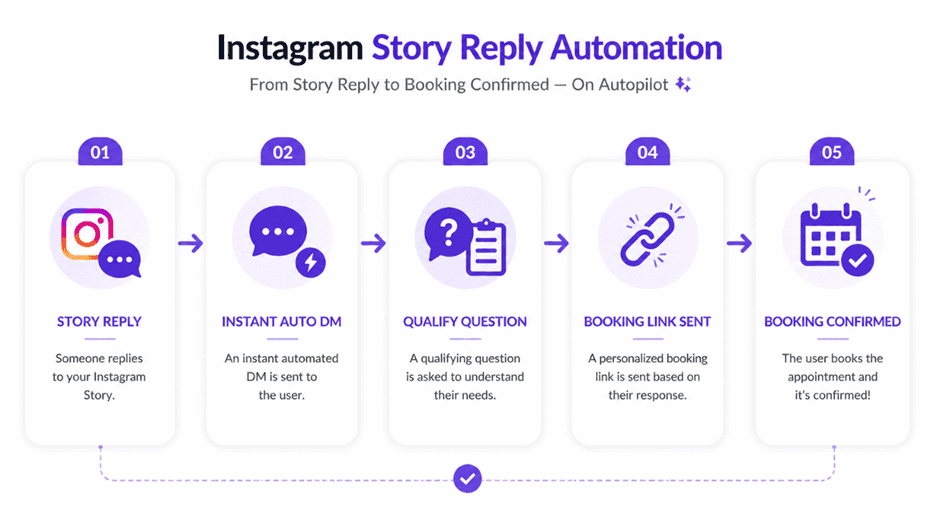
The 3-Step DM Flow That Converts Story Replies Into Bookings
You don't need a complex funnel. You need speed + clarity.
Here's the exact Instagram Story reply automation flow that converts:
Step 1 — Acknowledge
Respond instantly with a warm, human opener. Automation sends this within seconds.
Step 2 — Qualify
Ask one simple question to understand their intent. Don't ask five — ask one.
Step 3 — Guide to Booking
Send the booking link only when intent is clear.
Example Flow:
Story CTA:
"3 slots left this week. Reply BOOK."
Auto-DM 1:
"Hey! Happy to help — what are you looking to book?"
Auto-DM 2:
"Are you thinking this week or a later date?"
Auto-DM 3:
"Here's the booking link — pick a time that works for you: [link]"
Simple. Fast. Converts.
5 Instagram Story Types That Drive the Most Bookings
Not every Story drives action. These 5 types consistently work for Instagram booking automation:
1. Availability Stories
"Only 2 slots left this week. Reply BOOK." Creates urgency and a clear single action.
2. Result-Based Stories (Before & After)
Show a transformation or outcome. "Want results like this? Reply INFO." Works especially well for salons, clinics, and fitness businesses.
3. Poll Stories
Low-friction entry point. Follow up in DMs automatically: "Want to see pricing or available slots?"
4. Question Box Stories
High intent people are already asking questions. Perfect for Instagram booking automation because qualification is built in.
5. Offer Stories
"Free consultation today only. Reply CALL." Time-limited offers drive immediate replies and fast conversions.
These Story types work even better when your overall content is driving traffic into your DMs learn how in our guide on turning Instagram Reels into leads(Blog7).
What Your First Auto-DM Should Say
This is where most automations fail. The first message sets the entire tone.
❌ Don't send this:
"Thank you for contacting us. Please share your details."
✅ Send this instead:
"Hey! Happy to help. Are you looking to book for yourself?"
Or:
"Hi! Do you want pricing, available slots, or help choosing a service?"
Keep it short, clear, and human-sounding. The goal of the first DM is to continue the conversation not close the sale immediately.
How to Qualify Without Killing the Conversation
Don't interrogate your leads. Ask one smart qualifying question:
"What service are you interested in?"
"When are you planning to book — this week or later?"
"Are you a first-time client or returning?"
Too many questions = drop-off. One good question = momentum.
If they show clear intent → send the booking link immediately. If they're unsure → guide them gently with 2 options.
The same principle applies when you need to follow up on Instagram leads keep it natural, never pushy.
When to Send the Booking Link
Timing your booking link is the most important part of Instagram Story reply automation.
Send it when the user mentions:
Pricing or packages
Available slots or dates
A specific service they want
"How do I book?" or similar
Use this line every time:
"Here's the booking link — choose what works best for you. If you need help deciding, just reply!"
Always keep the door open. Some people book instantly. Others need one more nudge — and that's okay.
How PilotDM Automates This Entire Booking Flow
You don't need expensive tools or complicated setups for Instagram booking automation.
PilotDM is built specifically for Instagram-first DM automation. It lets you:
Auto-reply to Story triggers (BOOK, INFO, CALL, PRICE, SLOTS)
Ask qualifying questions automatically
Deliver booking links at exactly the right moment
Capture leads — name, email, phone — all inside the DM
And it's completely free to start — no credit card needed.
Full Instagram Booking Automation Flow — Copy This Today
Story:
"Want to book this week? Reply BOOK."
DM 1 — Instant auto-reply:
"Hey! What are you looking to book?"
DM 2:
"Are you thinking this week or a later date?"
DM 3:
"Here's your booking link — pick a slot that works: [link]"
Optional add-on: Capture their email before sending the link — full guide here: How to Collect Emails Through Instagram DMs.
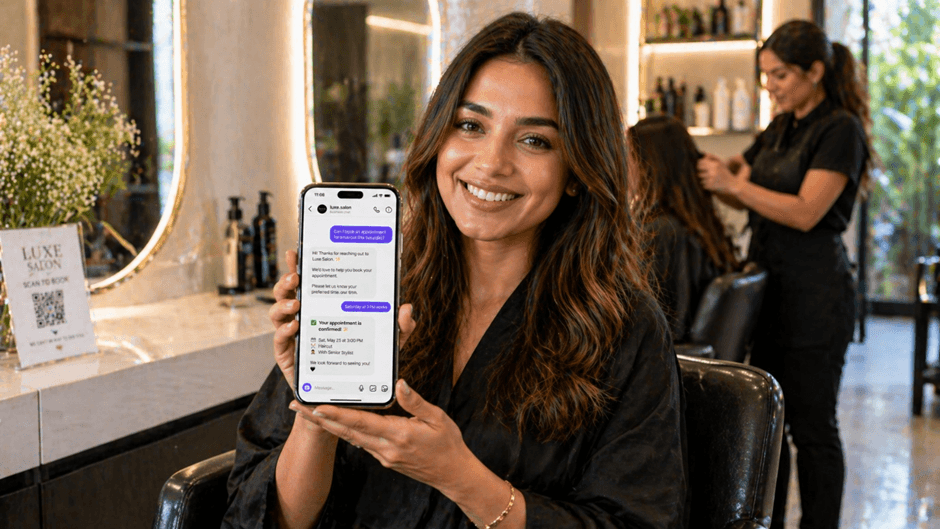
Key Takeaways
Instagram Story reply automation captures warm leads the moment they show intent
Speed is everything reply within seconds, not hours
Use the 3-step flow: Acknowledge → Qualify → Book
Send the booking link only when intent is clear
The right tool makes this entire flow free and automatic
Frequently Asked Questions
Can Instagram Story replies really convert into bookings?
Yes. Story replies are among the highest-intent actions on Instagram the person already engaged, opened your profile, watched your Story, and chose to reply. That's a warm lead.
What is Instagram Story reply automation?
It's a system that automatically sends a DM when someone replies to your Instagram Story so you capture every lead instantly, even while you sleep.
Should I automate all Story replies?
No. Only automate high-intent triggers like BOOK, PRICE, INFO, and SLOTS. Casual or general replies can stay organic.
What should my first automated DM say?
One warm, simple question that moves toward booking not a form or a long message. Example: "Hey! What are you looking to book?"
When is the right time to send the booking link?
The moment someone asks about pricing, availability, slots, or a specific service. Don't send it in the very first message.
Is PilotDM free for Instagram booking automation?
Yes. PilotDM is free to start no credit card needed. It's built for creators and small businesses who want simple, effective Instagram DM automation.