How to Switch Instagram DM Tools Without Losing Your Automations (2026)

You have decided to switch Instagram DM automation tools. Maybe your bill climbs every time a Reel performs. Maybe you are paying for four channels you never open. Maybe the flow builder takes forty minutes just to change a keyword.
These are the three reasons creators most often leave tools like ManyChat, and whatever your reason, one worry stops most people: "Will I lose my automations, and will leads slip through while I switch?"
The honest answer: your flows will not transfer automatically, but a clean migration takes about an hour and you do not have to lose a single lead. This guide walks through exactly how to do it, what transfers, what does not, and the mistakes that cause downtime.
Quick answer: Instagram DM automations do not transfer between tools automatically, because each platform builds flows differently. The safe migration order is: document your existing automations, export your contacts as CSV, build and test the same flows in the new tool, switch over on a quiet day, then disable the old automations and revoke the old app's access in Instagram Settings. Budget about 1 to 2 hours for 3 to 5 automations, and always revoke old access last so you never have two tools messaging the same person.
What Actually Transfers (And What Does Not)
Setting expectations first saves a lot of frustration.
Does not transfer:
Your automations and flows. Every tool structures triggers, delays, and conditions differently. There is no universal import button. You rebuild them.
Conversation history. Past DM threads stay in your Instagram inbox, but the old tool's internal logs do not move.
Analytics and reporting history. You start fresh on the new platform.
Does transfer (with a little work):
Your contacts. Most tools, including ManyChat, let you export subscriber data as a CSV, which you can import into the new tool or your email platform.
Your message copy. Your DM text, keywords, and links are all reusable. That is the part that took you the longest to write, and it comes with you.
Stays untouched:
Your Instagram account, followers, and DM inbox. Switching tools does not affect any of it. You are only changing which app has permission to send on your behalf.
The practical takeaway: migration is copy and recreate, not import. Budget roughly 20 to 30 minutes for one to three simple automations, or about an hour per complex flow with conditional logic.
Step 1: Document Everything Before You Touch Anything
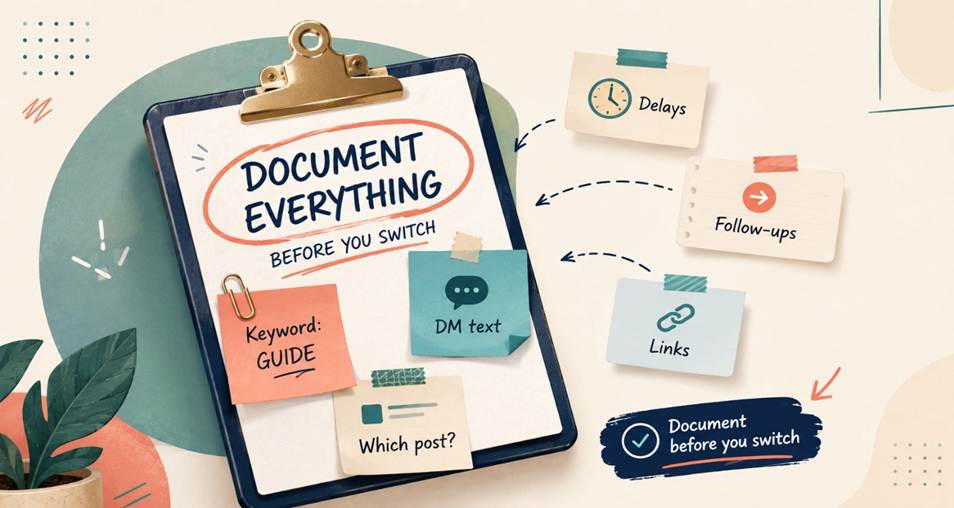
Do this first, while your old tool is still running. Open each active automation and record:
The trigger keyword (and any variations)
Which post or Reel it is attached to
The exact DM text, including links
Any public comment reply text
Delays or timing between messages
Any follow-up sequence steps
Conditions or branches, if you use them
Screenshots work fine, but a simple spreadsheet is better because you can copy and paste the text straight into the new tool. This step is the whole migration. Once your flows are documented, rebuilding them is fast.
Step 2: Export Your Contacts
Most platforms allow a CSV export of your subscriber list, usually from an Audience or Contacts tab. Note that some tools, ManyChat included, restrict export to paid plans, so do this before you downgrade or cancel.
Once exported, you have two good options: import the list into your new tool if it supports contact import, or push it into your email platform so you own that audience independently of any DM tool. The second is worth doing regardless. Contacts that live only inside one vendor are contacts you can lose. Our guide on collecting emails through Instagram DMs covers building that list properly.
Step 3: Build and Test in the New Tool First
This is the step people skip, and it is the one that prevents downtime.
Do not turn off your old automations yet. Connect the new tool to your Instagram account, rebuild your most important automation from your documentation, and test it end to end with a second account. Confirm that the trigger fires, the DM arrives, links work, and any follow-up sequence runs correctly.
Only once the new flow is verified should you move to the switchover. Running both tools briefly is fine as long as only one has an active automation on the same post, which brings us to the most important rule.
Step 4: Switch Over Cleanly (The Overlap Rule)
The single biggest migration mistake is leaving both tools active on the same post. When that happens, one commenter can receive two DMs from you, which looks broken to them and reads as spam to Instagram.
The clean sequence:
Pick a quiet day. Do not migrate the morning after a Reel goes viral or mid-launch.
Turn off the old automation on a given post.
Turn on the new one for that same post immediately after.
Repeat post by post rather than switching everything at once.
Doing it post by post keeps any gap down to seconds and makes it easy to spot a problem before it affects all your flows.
Step 5: Revoke the Old Tool's Access (Do This Last)
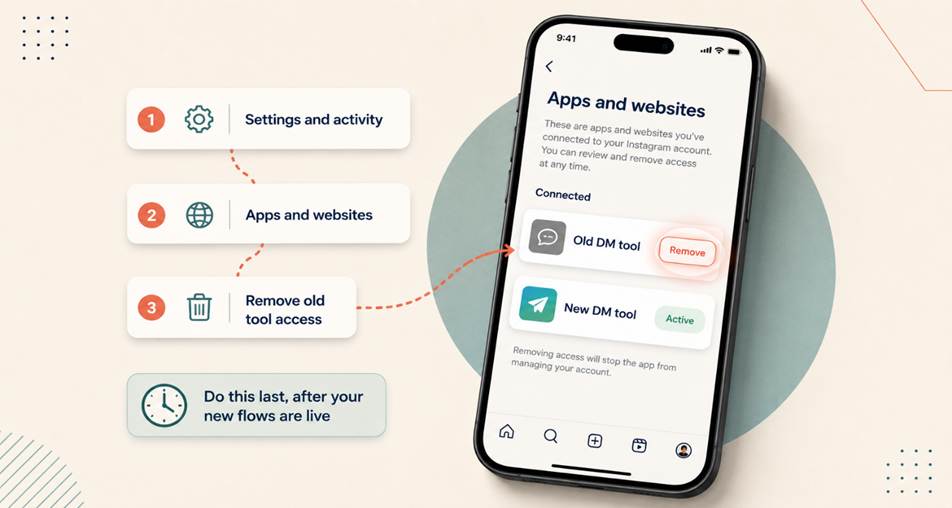
Once your new automations are confirmed working, remove the old tool's permissions. Disabling automations is not the same as revoking access; the old app can still hold a valid token to message on your behalf.
To revoke properly:
Open Instagram and go to Settings and activity
Tap Apps and websites (under Website permissions)
Find the old tool and remove its access
Then cancel the subscription in the old tool's billing settings
You can confirm the current path on the Instagram Help Center. Do it in that order. If you cancel billing first, you may lose access to the dashboard before you have finished exporting or documenting anything. Our guide on removing authorized apps from your Instagram account walks through this in detail.
Handling the Switchover Gap
Even a clean migration has a short window where a comment might land between your old automation turning off and the new one turning on. Two ways to handle it:
Prevent it: switch during a low-traffic hour, and do it post by post so the gap is seconds, not hours.
Recover it: after switching, check the comments on your active posts for anyone who used your keyword during the gap and reply to them manually. If you switched during a quiet window, this is usually a handful of people at most.
Remember Instagram's 24-hour messaging window: you can only message someone within 24 hours of their interaction. So if you spot missed comments, handle them the same day. Waiting until next week means those leads are unreachable.
A Migration Checklist You Can Follow
✅ Document every automation (keyword, post, DM text, links, delays, follow-ups)
✅ Export contacts as CSV before downgrading or cancelling
✅ Connect the new tool and rebuild your top automation
✅ Test end to end with a second account
✅ Switch post by post on a quiet day, old off then new on
✅ Check for comments that landed during the gap, reply within 24 hours
✅ Revoke old app access in Instagram Settings
✅ Cancel the old subscription last
What to Look for in the Tool You Switch To
Since you are already doing the work, make sure the next tool solves what pushed you out of the last one:
Official Meta API. Non-negotiable. Never a tool that asks for your Instagram password. See is Instagram automation safe.
Pricing that does not punish growth. If your bill rises every time a post performs, you will be migrating again in a year.
Handles volume spikes. Ask what happens at 5,000 comments in an hour. Good tools queue and pace; weak ones drop messages.
Covers your whole funnel. Comment-to-DM, Story replies, lead capture, and follow-ups in one place, so you are not stitching tools together. Our DM funnel guide covers what a complete setup looks like.
Fast to edit. If changing a keyword takes forty minutes, you will stop optimizing.
Migrating to PilotDM
If PilotDM is where you are heading, the rebuild is quick. Connect your Instagram Business or Creator account, recreate your keyword triggers from your documentation, and test with a second account. Most creators are live in about ten minutes per automation, and our 10-minute setup guide walks through it.
PilotDM runs entirely on Meta's official Instagram API, and Safe Mode paces your public replies so a sudden spike in comments never puts your account at risk, which matters most in the first weeks after a switch when you are testing new flows at volume.
Final Thoughts
Switching DM tools is not risky. Switching carelessly is. The flows themselves take minutes to rebuild; what protects you is the order of operations: document, export, build, test, switch post by post, then revoke.
Do it that way and the whole thing is a quiet afternoon of work, with no lost automations and no leads falling through.
You can rebuild your automations and be live in minutes. Get started at https://pilotdm.com.
FAQ
Do Instagram DM automations transfer when you switch tools?
No. Flows do not transfer automatically because every platform structures triggers, delays, and conditions differently. You rebuild them manually. Your contacts can be exported as CSV, and your DM copy and keywords are fully reusable, so the rebuild is faster than it sounds.
How do I switch from ManyChat to another Instagram DM tool?
Document each active ManyChat automation (trigger keyword, post, DM text, links, delays), export your contacts as CSV from the Audience tab while still on a paid plan, rebuild and test the flows in your new tool, then switch post by post. Finally, revoke ManyChat's access in Instagram Settings and cancel the subscription last.
How long does it take to migrate DM automation tools?
Budget 20 to 30 minutes for one to three simple comment-to-DM automations, and about an hour per complex flow with conditional logic. A typical creator with 3 to 5 automations finishes in 1 to 2 hours. Agencies with 10 or more flows should plan half a day.
Will I lose leads while switching?
Not if you switch post by post. Turn the old automation off and the new one on back to back, during a quiet hour, so the gap is seconds. Afterwards, check for any comments that landed during the gap and reply within Instagram's 24-hour messaging window.
Can I run two DM automation tools at the same time?
Briefly, yes, while you test. But never leave both active on the same post: a commenter could receive two DMs, which looks broken and reads as spam. Keep one active automation per post at all times.
How do I disconnect my old DM tool from Instagram?
Go to Settings and activity, then Apps and websites, find the old tool, and remove its access. Do this after your new automations are confirmed working, and cancel the old subscription last so you do not lose dashboard access before finishing your export.
Does switching DM tools affect my Instagram account or followers?
No. Your account, followers, posts, and DM inbox are unaffected. You are only changing which app has permission to send messages on your behalf. Past conversations stay in your Instagram inbox.
Written by the PilotDM team. We build official-API Instagram DM automation for creators and small businesses, and we help them migrate their flows without downtime or lost leads.