How to Set Up Instagram DM Automation for Free in 10 Minutes

You posted a Reel. The comments are coming in. People are asking for the link, the price, the details.
And you are at dinner.
By the time you get back to your phone, half of them have moved on. Not because they lost interest. Because nobody replied. In the DM world, speed is everything. The creator who responds in 10 seconds beats the one who responds in 4 hours every single time.
The good news is you do not have to be glued to your phone. You just need to set this up once.
Here is exactly how to do it in 10 minutes for free.
Before You Start: Two Things You Need
An Instagram Business or Creator account. If you are on a personal account, do not worry. PilotDM walks you through switching during setup and it takes under a minute.
A free PilotDM account. No credit card. No trial countdown. Just sign up at https://pilotdm.com and you are in.
No developer. No integration headaches. No tutorial videos you have to pause 47 times.
Step 1: Connect Your Instagram
Sign up on PilotDM, verify your email with the 6-digit code they send, and you will land straight on the Connect Instagram screen.
Click Connect with Instagram. A login popup appears. This is Instagram's own secure window, so PilotDM never sees your password. Log in, grant the permissions it asks for including profile access, comments, and messages, and you are done.
If your account is still personal, Instagram will prompt you to switch to Creator or Business right here. One click and you are through.
You will see a success screen. Click Continue. Your dashboard is waiting.
Step 2: Pick Your Automation
This is where most people overthink it. PilotDM gives you three templates in the Start Here section of your dashboard. Each one covers a different way people interact with your content.
Auto-DM Links from Comments means someone comments a keyword on your post or Reel and they get an instant DM. This is the one that drives the most leads.
Auto-Respond to Story Replies means someone replies to your Story and they get an instant DM. Best for warm audiences who are already paying attention. To see exactly how Story replies turn into real leads, read Instagram Story reply automation for small businesses.
Auto-Respond to DMs means someone messages you directly with a keyword and they get an instant reply. Perfect for pricing questions and after-hours inquiries.
For your first automation, start with comments. It is the easiest to test and shows results the fastest.
Click Use Template, give it a name, hit Continue.
Step 3: Set Your Trigger
Choose which post or Reel triggers this automation. You can pick a specific one, apply it to all posts, or activate it on your next upcoming post.
Then choose your keyword. This is the word people will comment to trigger the DM.
Keep it one word. Simple. Obvious.
LINK. FREE. GUIDE. PRICE. BOOK.
Put it in your caption like this: "Comment FREE below and I will send it to you instantly."
The simpler the keyword, the more comments you get. Do not overthink this part.
Step 4: Write the DM That Actually Converts
This is where most automations either win or lose.
Your opening message is the first thing someone reads after commenting. It needs to feel like a human sent it, not a bot, not a brand, not a template.
Here is the difference:
Bad opening DM: "Thank you for your interest. Your request has been received and the details will be sent shortly."
Good opening DM: "Hey! So glad you asked, here is exactly what you need 👇 Click below and I will send it right over."
Same information. Completely different feel. One sounds like a bank. The other sounds like a friend.
Add a Button label like "Send me the details" or "Yes, show me" to guide them to the next step. Then write your main message with the actual link, offer, or information you promised.
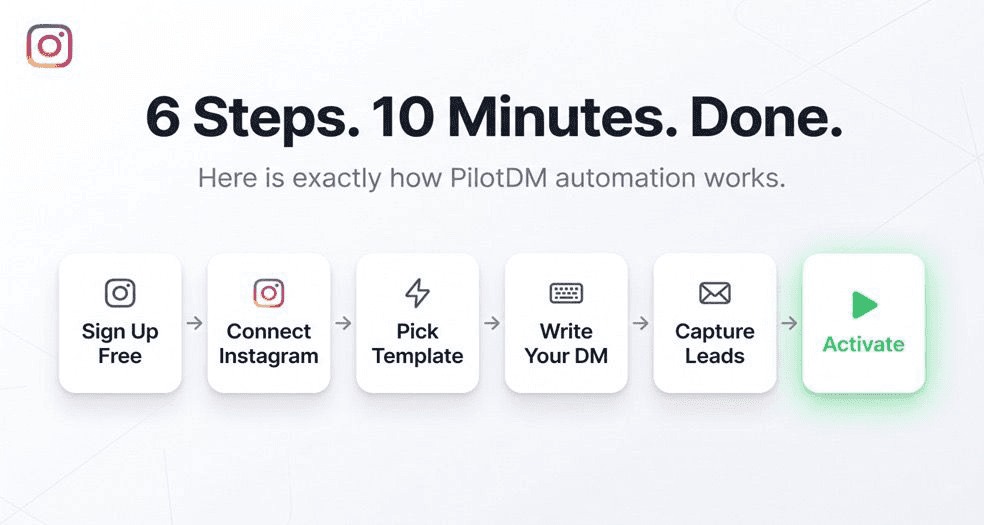
Step 5: Turn Comments Into Actual Leads
Sending a link is fine. Building a lead list is better.
Before delivering your main message, toggle on Ask for email before sending details. PilotDM will ask the user for their email inside the DM conversation and capture it automatically before sending them what they asked for.
This one toggle is what separates creators who get link clicks from creators who build actual email lists from Instagram.
You can also toggle on Follow up to grow engagement to send an automatic follow-up message after the main DM goes out, keeping the conversation warm without any extra effort from you.
For more on how to keep leads warm after the first DM, read how to follow up on Instagram leads without sounding spammy.
Step 6: Go Live
Click Activate.
That is it. Your automation is live. Go post your Reel with the keyword CTA in the caption and watch what happens.
If you want to save it and finish later, click Save as Draft and it will be there waiting for you.
The First 48 Hours
Most creators are surprised by two things.
First, how fast the DMs go out. Within seconds of a comment, not minutes, not hours. Seconds. That speed alone changes how people perceive your brand.
Second, how much they were missing before. Comments that would have gone unanswered. Story replies that would have been seen too late. Leads that simply evaporated because nobody responded in time.
Your automation does not take days off. It does not get distracted. It does not forget to reply. It just works, every comment, every reply, every time.
To see how to use this same setup to collect emails at scale, read how to collect emails through Instagram DMs.
Three Mistakes That Kill First Automations
Writing a DM that sounds like a notification. If your message reads like a system alert, people ignore it. Read it out loud. If you would not say it to a friend, rewrite it.
Skipping the email capture step. A link click disappears. An email address stays. Always add the capture step. It takes 10 seconds to toggle on and changes everything.
Testing on a post with no traffic. Your first automation needs real comments to trigger. Set it on a Reel you are about to promote or your most active post. Low traffic means slow results and slow feedback.
Final Thoughts
There is a version of your Instagram where every comment gets a reply in seconds. Every Story reply turns into a conversation. Every interested person becomes a lead whether you are online, offline, or asleep.
That version takes 10 minutes to set up. It costs nothing to start. And it runs itself every single day after that.
The only thing left to do is actually do it.
👉 Start free at https://pilotdm.com
FAQ
Can I really set up Instagram DM automation for free?
Yes. PilotDM's free plan includes comment-to-DM automation, Story reply flows, and lead capture with no credit card required. Your first automation can be live in under 10 minutes.
Do I need any technical skills to set this up?
None at all. PilotDM is template-based. Pick a template, write your message, click Activate. If you can write an Instagram caption, you can set this up.
Will using automation get my account flagged or banned?
Not with PilotDM. It connects through Meta's official Instagram API which means everything you do is fully compliant with Instagram's terms of service.
What keyword should I use for my first automation?
One simple word that matches what you are offering. FREE, GUIDE, LINK, or BOOK. Put it in your caption as a clear CTA and let the automation do the rest.
How fast does the DM go out after someone comments?
Within seconds. That speed is what makes automation so effective. By the time someone finishes reading your caption, the DM is already in their inbox.