Facebook Messenger for Restaurants & Cafes (2026 Guide)

Every day, people message your restaurant's Facebook Page asking the same things: Are you open? Do you take reservations? Can I see the menu? Do you deliver? Miss those messages, or reply an hour later, and that hungry customer has already booked somewhere else. Facebook Messenger automation fixes that, turning every question into a booking, an order, or a repeat visit.
This is the 2026 guide for restaurants and cafes. You will learn exactly what to automate, reservations, menus, orders, and FAQs, and how to set it up so your Page works like a host who never sleeps.
Quick answer: Restaurants and cafes use Facebook Messenger automation to instantly answer common questions (hours, location, menu), take reservations, handle order-ahead and delivery requests, and send review or loyalty follow-ups, all automatically. The result is fewer missed customers, less time on the phone, and more bookings, because the reply fires in seconds, even when the kitchen is slammed.
Why Messenger matters for restaurants in 2026
Diners decide fast. When someone is hungry and messaging three restaurants at once, the one that replies first usually wins the table. The problem is obvious: during a lunch rush, nobody has time to answer DMs.
That is exactly what automation solves. A customer asks "table for 4 tonight?" and an instant reply fires with your availability, before they message your competitor. Messenger is also where your regulars already are, so it doubles as a direct line for specials, events, and loyalty offers.
Restaurants that treat their Page as a conversation channel, not a poster board, book more covers and field fewer repetitive phone calls. If you run other local services too, our guide on Facebook Messenger for local business covers the booking-first setup in full.
The 5 things every restaurant should automate
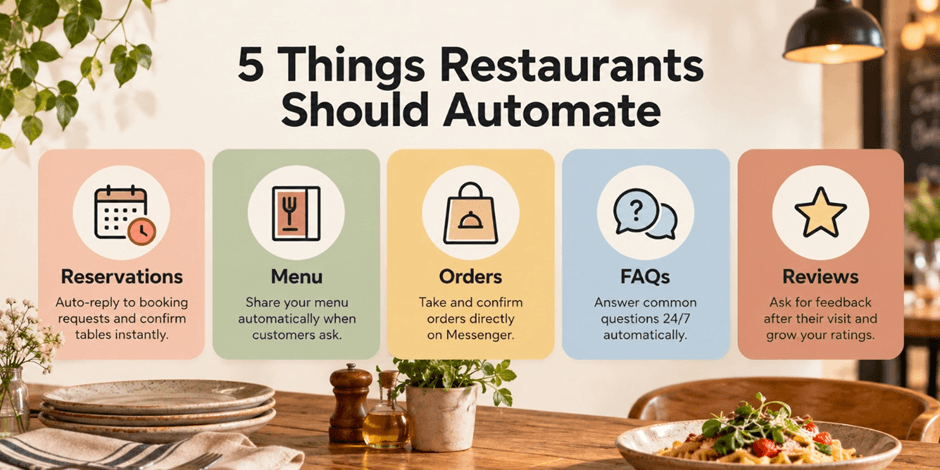
1. Reservations. When someone asks about a table, an automated flow can ask for party size, date, and time, then send a booking link or confirm the slot, no phone tag.
2. The menu. "Can I see the menu?" is the most common DM a restaurant gets. Automate an instant reply with your menu link or a photo, plus today's specials.
3. Order-ahead and delivery. Route "do you deliver?" or "can I order ahead?" straight to your ordering link or a simple pickup flow. Catch the order while the craving is fresh.
4. FAQs. Hours, location, parking, dietary options, and "are you open?" are asked constantly. Automate them once and stop answering the same four questions all day.
5. Review and loyalty follow-ups. After a visit, an automated message can politely ask for a review or share a loyalty offer to bring them back. This is where repeat revenue hides.
Most competitor guides stop at reviews and giveaways. The real money is in the first three, reservations, menu, and orders, because they capture the customer at the moment they are ready to spend.
How comment-to-DM works for restaurants

Here is the highest-leverage play for a restaurant Page. You post a mouth-watering photo of a dish or a weekend special and add a caption: "Comment MENU and we'll send it straight to you."
When someone comments, an automated DM fires instantly with your menu, your booking link, or today's offer. The comment boosts your post's reach (Facebook rewards engagement), and the DM captures a warm, hungry lead. One post can fill a slow Tuesday night. For the full mechanics, see our guide on Facebook comment-to-DM automation.
A simple Messenger setup for your restaurant
You do not need anything complicated. Start here:
Instant welcome reply. The moment anyone messages, fire a greeting: "Hi! Thanks for messaging [restaurant]. Looking to book a table, see the menu, or order ahead?"
Three quick-reply buttons. Let them tap "Book a table", "See menu", or "Order" so they self-select in one tap.
Route each path. Booking goes to your reservation link, menu sends your menu, orders go to your ordering page.
An away message. Outside hours, reassure them: "We're closed now but back at [time]. Leave your request and we'll confirm first thing."
A follow-up. A day after a visit, send a friendly review request or a "come back" offer.
For ready-made message wording, grab our Facebook Messenger auto-reply templates and swap in your details.
Where PilotDM fits for restaurants
Meta's native Page tools can set a basic greeting, but they cannot run keyword comment-to-DM (the "comment MENU" play), branch customers into booking versus ordering, or send automatic follow-ups.
PilotDM does all of it. It fires an instant reply, runs comment-to-DM so a photo of your special turns commenters into orders, routes customers to booking or ordering links, and sends review follow-ups, all on Meta's official API so your Page stays safe, with no per-contact billing as your audience grows. You can start free and have your restaurant's first flow live in minutes.
4 mistakes restaurants make on Messenger
Replying too slowly. A hungry customer waits minutes, not hours. Automate the first reply.
Only posting, never conversing. Your Page is a booking channel, not just a menu board.
No comment-to-DM. You are leaving reach and leads on the table every time you post food.
Ignoring follow-ups. One polite review request after a visit builds the reputation that fills tables.
Is Messenger automation right for your restaurant?
If customers message your Page before they visit, and they do, then yes. Reservations, order-ahead, delivery questions, and menu requests are all repetitive, time-sensitive, and perfect for automation. Cafes, bistros, cloud kitchens, bars, and full-service restaurants all benefit.
The only restaurants that may not need it are tiny spots with almost no online presence, and even they usually get "are you open?" DMs worth automating.
FAQ
Can I take restaurant reservations through Facebook Messenger?
Yes. An automated flow can collect party size, date, and time, then send a booking link or confirm the table, no phone call needed.
How do restaurants send menus automatically on Messenger?
Set an automated reply that fires your menu link or photo whenever someone asks, or use a "comment MENU" post so commenters get the menu in their DMs instantly.
Is Messenger automation allowed for restaurants?
Yes, as long as you use Meta's official tools or an official-API tool like PilotDM and stay inside the 24-hour messaging window for promotions.
Do I need a chatbot developer?
No. Modern tools are no-code. You set up reservation, menu, and order flows visually, then they run on their own.
Can I use this for a cafe or small bar too?
Absolutely. Any food business that gets DMs about hours, menus, or bookings benefits from automating the reply.
Written by the PilotDM team.