How to Automatically Send a DM When Someone Comments on Instagram

Instagram can get you attention fast.
But attention means very little if it dies in the comments section.
Someone watches your reel, likes what they see, and comments:
“Price?”
“Link?”
“Need details.”
“How do I book?”
That is not random engagement. That is intent.
And yet most creators and local businesses still handle these moments badly. They reply late, miss comments, send people to the link in bio, or promise to follow up later and never do. By the time they respond, the momentum is gone.
That is exactly why more brands now want to know how to automatically send a DM when someone comments on Instagram.
Because the real opportunity is not just getting comments. It is turning those comments into conversations while interest is still fresh.
That is what comment-to-DM automation does.
It helps you respond instantly, guide people to the next step, and turn engagement into something more valuable: signups, leads, bookings, and enquiries.
What does comment-to-DM mean on Instagram?
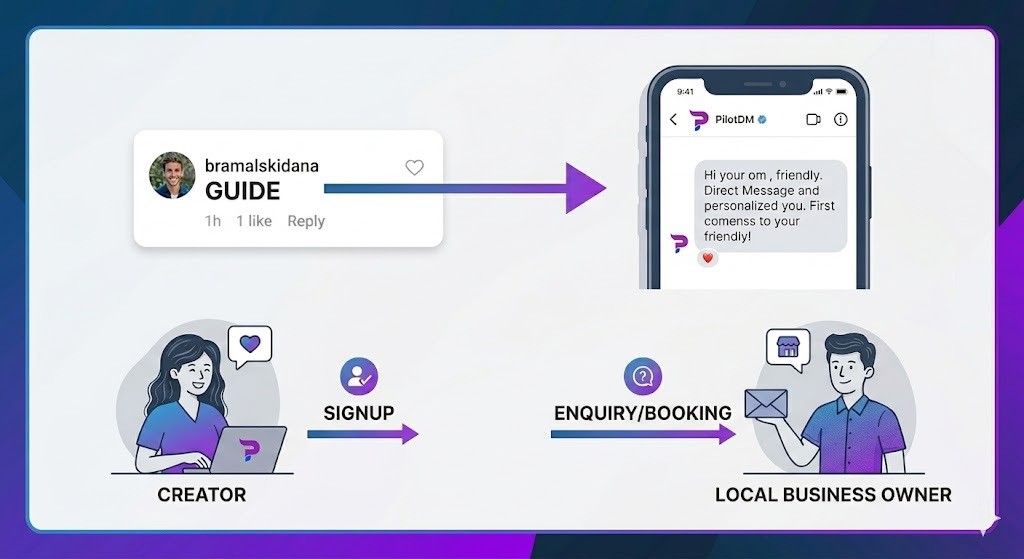
Comment-to-DM is simple.
When someone comments on your Instagram post or reel, they automatically receive a direct message based on that action.
So if your post says:
“Comment GUIDE and I’ll send it to you”
the person comments GUIDE, and they instantly get a DM with the next step.
That DM could include:
a signup link
a free guide
a booking link
pricing details
product information
a simple qualifying question
The goal is not automation for the sake of looking advanced.
The goal is to reduce friction between interest and action.
Why this works better than “link in bio”
“Link in bio” sounds easy, but it often slows people down.
The user has to leave the post, go to your profile, find the correct link, click it, and still remember why they wanted it in the first place.
That is too much effort for someone who was casually scrolling a moment ago.
Now compare that with comment-to-DM:
They comment.
They get a DM instantly.
They tap the next step.
That feels natural.
If you want more traffic, signups, or leads, fewer steps usually win. That is why comment-to-DM often converts better than sending everyone back to your bio.
Why this matters for creators
Creators often sit on hidden demand without realizing it.
People want your checklist, your setup, your workflow, your recommendation, your template, or your course link.
But when every interested follower has to manually find your link or wait for your reply, your content is doing all the work while your system does almost nothing.
For example, you post:
“Comment CHECKLIST and I’ll send you the exact one I use.”
Now instead of hoping people click around your profile, you can send the checklist instantly, collect a lead, and move them toward signup.
That changes the role of the post completely.
It is no longer just content. It becomes an entry point into your funnel.
Why local businesses should use it too
For local businesses, Instagram comments are often direct buying signals.
People ask:
price?
menu?
timings?
location?
do you deliver?
how do I book?
These are not vanity comments. They are action-oriented questions.
And still, a lot of businesses reply too late or lose the lead completely.
Imagine this instead:
A salon posts:
“Comment BOOK and we’ll send today’s appointment link.”
A café posts:
“Comment MENU and we’ll send it instantly.”
A service business posts:
“Comment QUOTE and we’ll send the next steps.”
That is where Instagram starts becoming more than a visibility platform. It starts becoming a reliable lead channel.
How to automatically send a DM when someone comments on Instagram
If you want to do this properly, the setup needs to stay simple.
1. Create one clear post CTA
Tell people exactly what to comment.
Examples:
Comment GUIDE
Comment PRICE
Comment DEMO
Comment BOOK
Do not use vague CTAs like “comment below” if your goal is lead generation.
2. Use the comment as the trigger
The comment is the signal that the person is interested. That is what starts the automation.
3. Send a useful first DM
Your first DM should feel relevant and human.
Bad example:
“Hello. Thank you for engaging with our content.”
Better example:
“Hey — thanks for commenting. Here’s the guide you asked for.”
Simple works better.
4. Add one clear next step
Your DM should push one action only:
sign up
book now
get the full resource
reply with your need
choose your category
One DM. One goal.
5. Follow up once if needed
A smart follow-up can recover warm leads.
Too many follow-ups make the whole flow feel forced.
What should the first DM say?
Most people overcomplicate this.
Your first DM does not need to sound impressive. It needs to sound useful.
Good examples:
Hey — thanks for commenting. Here’s the guide you asked for.
If you want the full version, start here.
Got you. Here’s the latest pricing.
If you want to book, use this link.
Thanks — here’s the next step.
Want me to send the full setup too?
The goal is to keep momentum alive, not overwhelm the user.
Best use cases for comment-to-DM
This works best when the post naturally creates a next step.
For creators
free guides
templates
checklists
course links
consultation links
email capture
For local businesses
menu sharing
booking links
pricing requests
service details
rate cards
appointment enquiries
For service-based brands
quote requests
demos
lead qualification
requirement collection
onboarding links
If the user is already showing intent in the comments, a DM is the fastest way to move them forward.
Common mistakes to avoid
Even good automation performs badly when the flow is weak.
1. Weak CTA
If your post is unclear, fewer people will comment with intent.
2. Too much in one message
Do not overload the DM with too many links or too many options.
3. Robotic copy
Automation can still feel human. Bad writing is what makes it feel fake.
4. No next step
If the user gets your DM and still does not know what to do, the flow is broken.
5. One message for everyone
A creator lead and a local customer asking for pricing are not in the same mindset. Your flow should reflect that.
Does comment-to-DM feel spammy?
It can, but only when it is done badly.
If someone comments asking for something and instantly receives the exact thing they expected, it does not feel spammy. It feels efficient.
The problem is rarely automation itself. The problem is irrelevant or badly written automation.
If the DM is connected to the comment and gives the user a clear next step, it feels helpful.
Where PilotDM fits in
This is exactly where a tool like PilotDM becomes useful.
Because the real need is not just sending a DM automatically. The real need is creating a path from:
comment → conversation → conversion
For creators, that means turning engagement into signups. For local businesses, that means turning interest into enquiries and bookings.
If your current Instagram process still depends on manual replies, delayed follow-ups, or “check the link in bio,” then you are leaving too much to chance.
A proper comment-to-DM setup fixes that.
Final thoughts
Most brands do not have an attention problem.
They have a follow-through problem.
Someone comments because they are interested. That moment matters.
If you respond instantly with something relevant, useful, and easy to act on, you keep the momentum alive. If you delay, overcomplicate, or send people on a longer journey, you lose them.
That is why learning how to automatically send a DM when someone comments on Instagram matters.
Not because it sounds advanced. Because it makes the next step easier.
And in marketing, the easiest next step usually wins.
FAQ
Can I use comment-to-DM even if I have a small Instagram page?
Yes. Smaller pages often benefit even more because every comment carries more value and every lead matters more.
Is comment-to-DM better than link in bio?
For many campaigns, yes. It reduces friction and keeps the user moving without asking them to manually navigate your profile first.
What kind of posts work best with this?
Posts offering a clear next step work best — guides, templates, pricing requests, bookings, menus, demos, and service enquiries.
What should I send in the first DM?
Send the exact thing the person expected when they commented, then include one clear next step.
Can local businesses in India use this for bookings and enquiries?
Yes. It works especially well for salons, cafés, clinics, service providers, and other local businesses that regularly receive pricing, booking, or availability questions on Instagram.
Can PilotDM help with comment-to-DM workflows?
Yes. PilotDM is built for flows like comment-to-DM, auto replies, story automation, lead capture, and signup-focused Instagram journeys.
Is PilotDM free right now?
Yes. Right now, you can position PilotDM as free to start, which makes it easier for creators and local businesses to test automated lead flows.
If your Instagram posts are getting comments but not enough leads, the problem may not be your content — it may be your follow-through.
Start free with PilotDM and turn Instagram comments into a consistent lead flow.